A three-day festival: the ticket knows its days, the crew its zones
A ticket for all days or for a single day, a three-stage programme in the app and on the website, radios, vests and crew meals by badge. And after the festival — how many people came on each day and to each stage.
- Example: Northstar Open Air
- a ticket for one day or all days
- three stages, three zones
- crew on badges
- presence by day and zone

Three days, three stages and a crew in the hundreds
A Saturday ticket turns up on Friday
Security can’t see a date on the ticket. So the gate decides by eye — and differently every time.
The headliner moved by an hour
The app and the website still show the old time. The audience finds out at the stage, when someone else is already playing.
The crew is a festival of its own
Volunteers, sound, light, kitchen, security. Each has their own days, zones, radio and lunch — all of it in different spreadsheets.
Plenty sold. How many came?
Sales are visible; how many people were there on Saturday and where the crowd stood are not. That is exactly what partners ask.
A festival as an Aditum configuration
Days, stages, crew and meals live in the settings of one event. A ticket’s days apply both at the gate and at lunch.
- All days
- Day 1 · 4 September
- Day 2 · 5 September
- Day 3 · 6 September
- Price phases
A ticket is valid on all days or on chosen ones, in any combination. The days pass to the buyer’s registration and to the Wallet pass.
- Main stage
- Forest stage
- Small stage
- In the app
- On the website
Every stage is a zone with its own programme. A set is published to the app and to the website with separate switches.
- Visitor
- Artist
- Crew
- Volunteer
- Contractor
- Press
Visitors come with a ticket; crew and volunteers register through closed forms. The category defines the badge and the zones.
- Radios — to be returned
- Volunteer vests
- Crew T-shirts by size
A norm per category, an exception per person with a reason. Who hasn’t returned a radio is visible before the shift ends.
- Crew breakfast
- Lunch
- Dinner
- Servings per category
The host scans the badge and sees how many servings the person is entitled to and how many were already served. A lunch outside the ticket’s days is not theirs.
- Arrivals by day
- Zone load
- Retention: day 1 → 2 → 3
Counted from scans at zone entrances. Where nobody scans, there are no figures.
Saturday or all three days — and a QR that knows its days
The buyer picks a day, pays and registers each ticket to its own person. The badge with the ticket’s days becomes the entry document: on those days the gate opens, on others it doesn’t.
Day one through the eyes of the operations team
-
09:00Console · programme
The headliner moves to 22:00
The producer changes the set time in the console, and the app and the website show the new one at once. A push to the audience from the set’s card — and visitors know before they walk to the stage.
Programme, speakers, partners →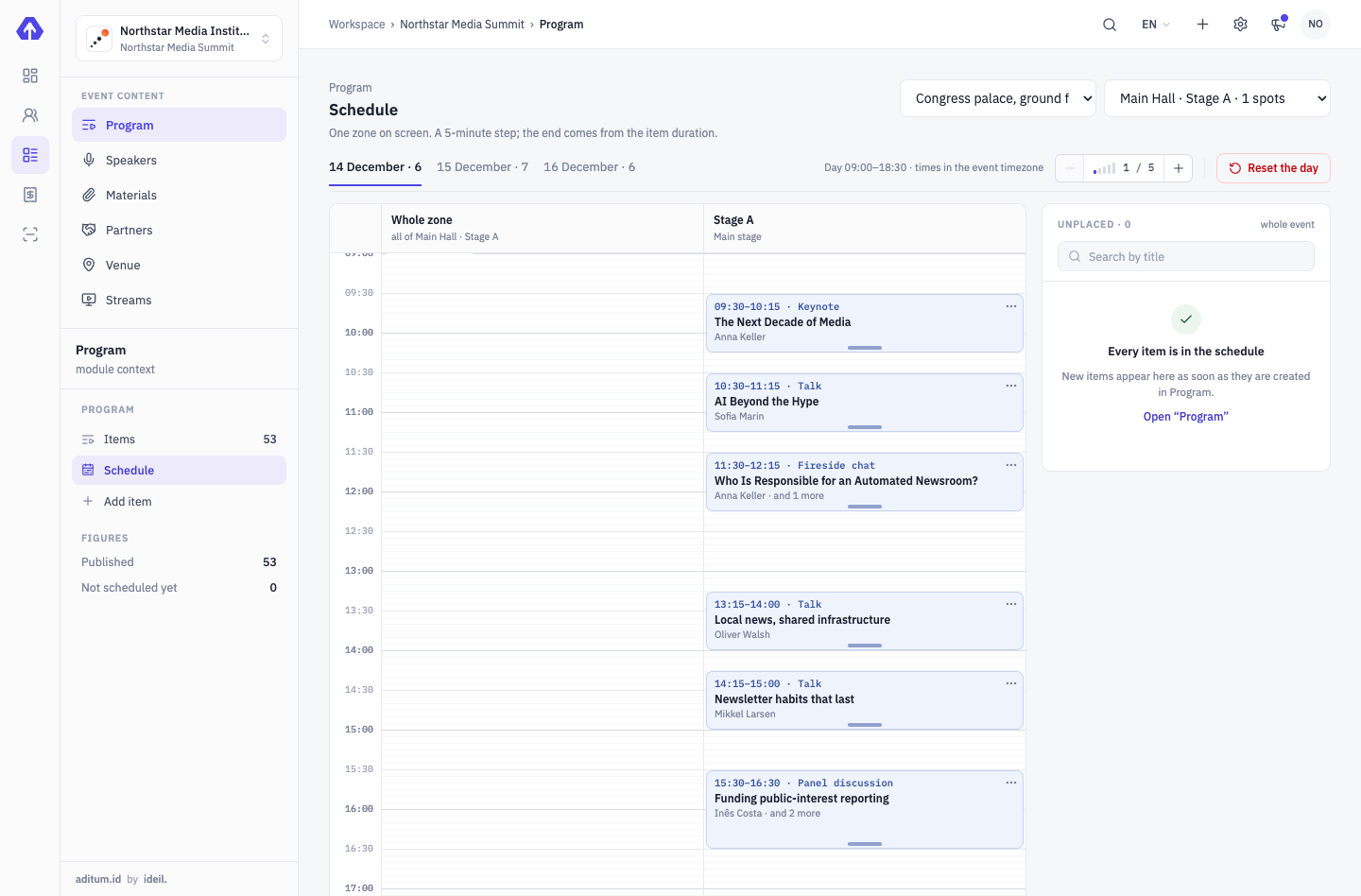
-
10:30Crew desk
A T-shirt by size, a power bank until the evening
The welcome kit is for everyone, the T-shirt for the crew only, and the desk sees what is left in each size. Power banks go out to be returned daily: whoever hasn’t brought one back on time lands on a separate list. Anything above the norm needs a reason.
On-site accreditation →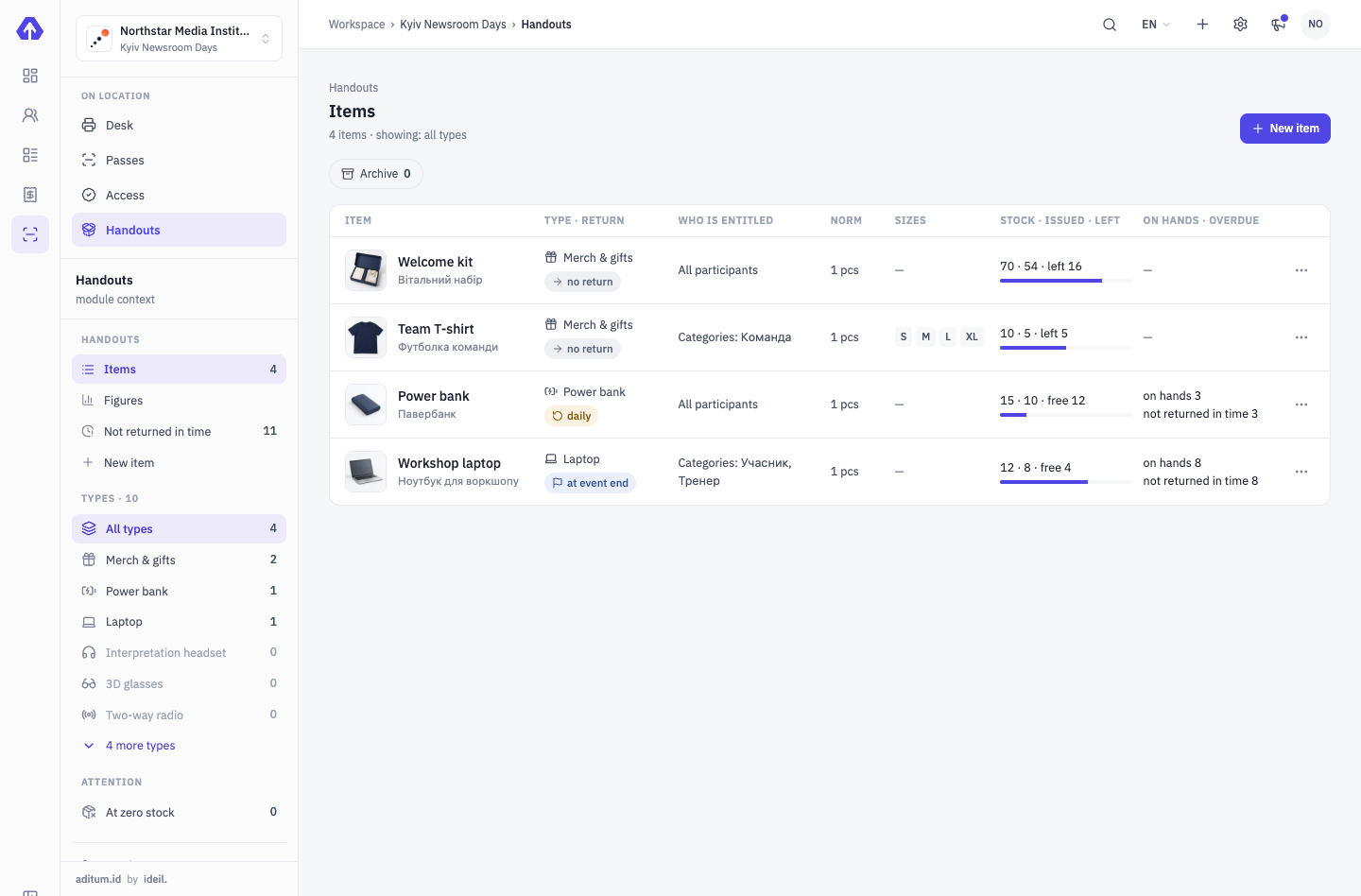
-
13:00Crew kitchen
Lunch by badge — no list on the door
Catering is planned as slots by day: breakfast, lunches, dinner, each with its own serving price and a norm per category. The host scans the badge, and the “served” count grows against the plan. The XLSX servings statement is there to check the restaurant’s invoice.
Logistics →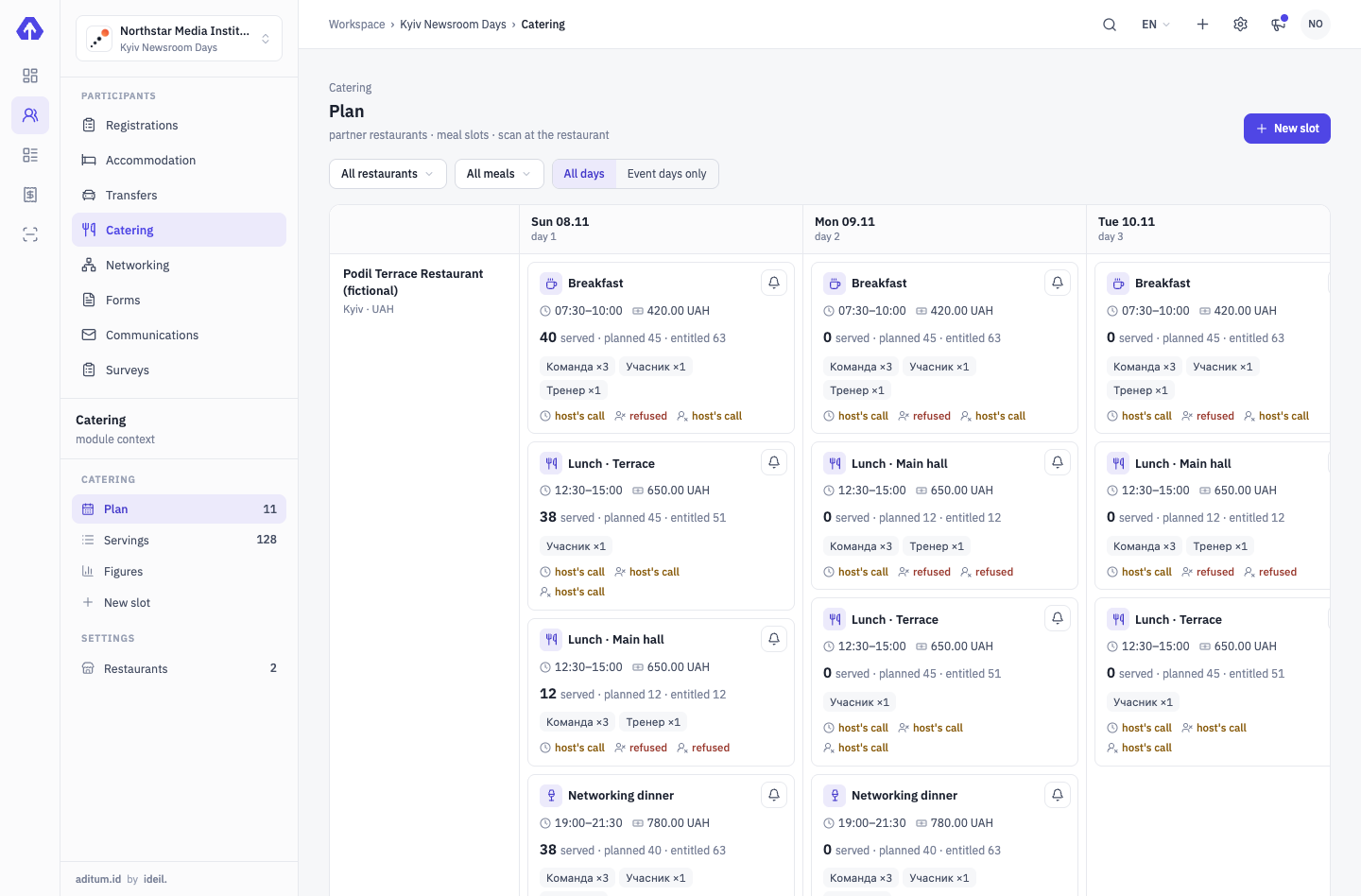
-
17:40Gate 2 · Forest stage
A Saturday ticket on Friday
Guard shows the refusal and the reason — the argument at the gate is over in a second. If the organizer decides to let the person in, they add a personal exception with a reason, and it shows in the log at once.
Aditum Guard →Gate 2 · Forest stage ENTRYDeniedMTMarko TkachukVisitor- Ticket
- Day 2
- Days
- 5 September
- Zone
- Forest stage
- Time
- 4 Sep, 17:40
Outside the ticket’s daysTap to continueEnter code manually -
23:30Console · analytics
How many people stood at each stage
Arrivals by day, entries minus exits by the hour and zone load are counted from scans at the gates. After day three you see how many came back on days two and three.
Analytics →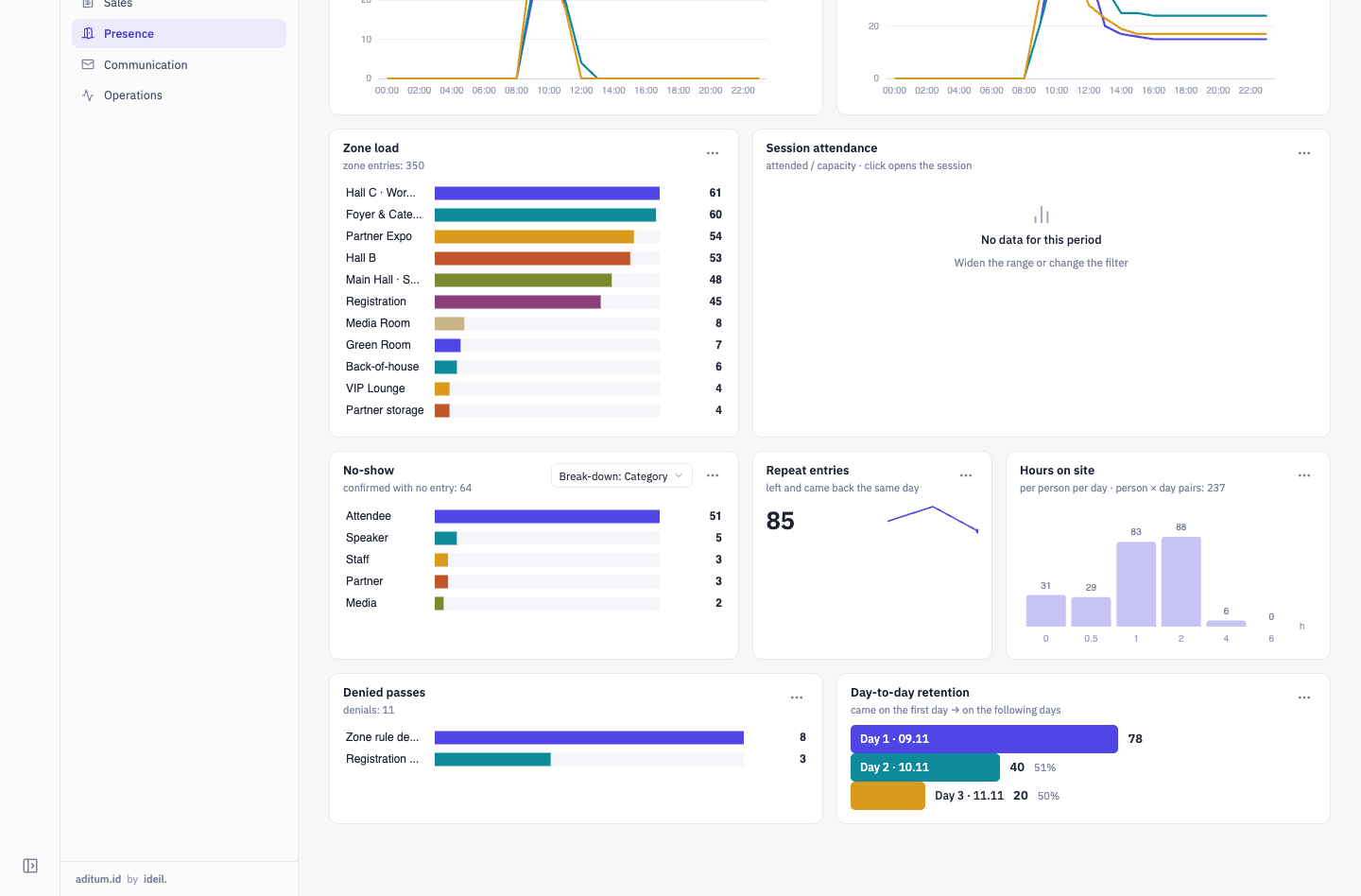


From a one-day ticket to presence figures
Questions and answers
Can I sell a ticket for a single day?
Yes. A ticket is valid on all days of the event or on chosen ones, in any combination. The buyer sees the dates next to the ticket, and Guard at the gate lets them in on those days only.
What if someone with a Saturday ticket comes on Friday?
Guard refuses and shows the reason “Outside the ticket’s days”. If you decide to let them in, a manager adds a personal exception or changes the days on the registration — both with a reason in the log.
How do we avoid feeding one person twice?
The host scans the badge and sees the norm and how much was already served. Beyond the norm it is a refusal or the host’s call, as you set it up. A mistaken serving is cancelled with a comment.
How do radios and vests come back?
A handout item can be returnable: the desk records who took what. At the end of the shift you see who still has items, with contacts.
Where do the presence figures come from?
Only from scans at zone entrances. Badge pick-up at the desk doesn’t count as presence, so where nobody scans there are no figures.
We’ll show it on your festival
Tell us about your days, stages and crew — in a 30-minute demo call we’ll show how it fits into one event.
Tell us about your event — we’ll show it on yours
A demo is a 30-minute call with the team that develops Aditum. Not slides but your scenario: we set up categories, approvals, zones and desks for your event.
- Fill in the form: event type, number of participants, a few words about it
- Within one business day we email you to agree a time
- On the call we show Aditum configured for your event and answer your questions